


🩸 RED BLOOD JOURNAL — REPORT #1780
💻 Who Is Windows Really Working For?
From Personal Computer to Corporate Ecosystem
August 9, 2026
RedBloodJournal.com
There was a time when updating a computer had a fairly simple meaning.
Something was broken.
The manufacturer fixed it.
A security vulnerability appeared.
The manufacturer patched it.
Hardware needed better compatibility.
A driver was updated.
The relationship was straightforward:
The computer belonged to the user, and the software served the computer.
But Windows has changed.
And perhaps the most important question surrounding Windows 11 isn’t whether Microsoft is secretly spying on everyone.
That question distracts from something we can actually document.
The better question is:
When Microsoft updates Windows today, who benefits from the change?
The user?
Microsoft?
Or both?
That distinction takes us much deeper into the evolution of the personal computer.
🖥️ The Original Personal Computer
Think about what the words personal computer originally meant.
The computer sat on a desk.
The owner installed programs.
The owner created documents.
The files remained on the machine.
The machine could be disconnected from the Internet and continue performing most of its functions.
Microsoft sold Windows.
The computer manufacturer sold the computer.
And after the sale, the machine largely belonged to the person who purchased it.
The economic transaction was mostly completed.
That model is disappearing.
☁️ The Computer Is Becoming a Relationship
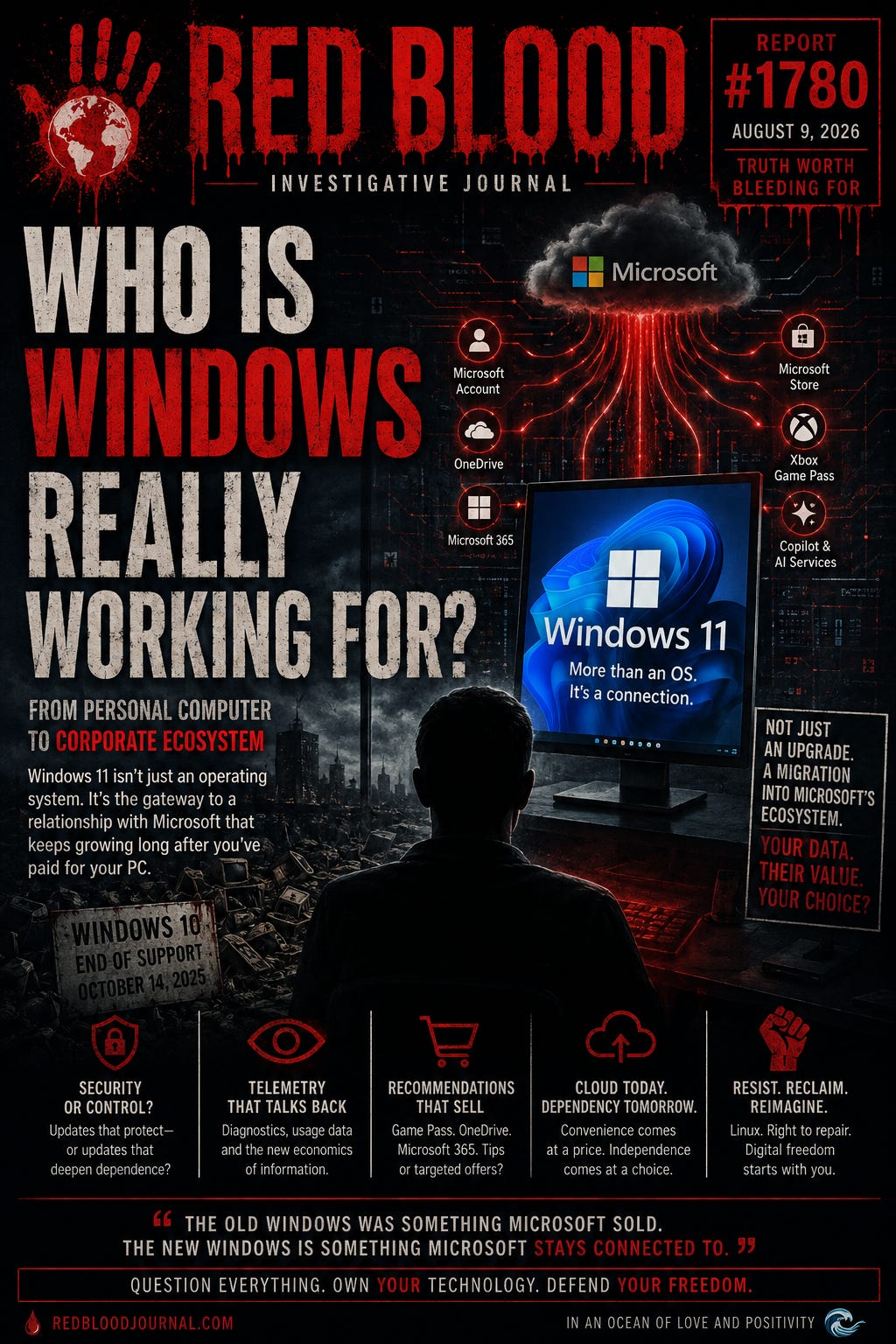
Modern Windows increasingly connects the computer with Microsoft’s larger ecosystem.
Microsoft account.
OneDrive.
Microsoft 365.
Microsoft Store.
Xbox services.
Cloud synchronization.
Windows Backup.
Personalized recommendations.
Diagnostic systems.
Copilot and AI services.
None of these things individually proves wrongdoing.
Many provide genuine convenience.
But collectively they represent an enormous transformation.
The computer is no longer merely running Microsoft’s operating system.
It is increasingly participating in Microsoft’s ecosystem.
That distinction matters.
📡 Windows Talks Back
Microsoft openly documents that Windows sends diagnostic information to Microsoft.
Required diagnostic information can include information about:
the device,
hardware and peripherals,
system configuration,
settings,
installed applications,
reliability,
and performance.
Microsoft says this information helps maintain security, diagnose problems, improve compatibility and determine which improvements should receive priority.
Those are legitimate purposes.
But there is another side.
When optional diagnostic collection is enabled, considerably more information about the way Windows and its applications are being used can be transmitted.
Microsoft even provides a Diagnostic Data Viewer so users can inspect diagnostic information being sent from their machines.
That means the basic observation isn’t controversial:
Windows communicates information about the computer back to Microsoft.
The important question is what happens next.
💰 When Diagnostics Meet Marketing
This is where the investigation becomes considerably more interesting.
Microsoft’s own documentation explains that diagnostic information can also support personalized experiences.
Depending upon the user’s settings, Microsoft says Windows can provide:
personalized tips,
recommendations,
offers,
and advertisements.
Microsoft’s documentation gives examples.
Tell Windows that the computer is used for gaming and Microsoft says the user might receive an offer for Xbox Game Pass.
Tell Windows the computer is used for school and the user might receive suggestions involving OneDrive.
Select business usage and Microsoft says the user might be offered a Microsoft 365 Business trial.
Think carefully about what has happened.
Information about how the computer is being used can help determine what commercial Microsoft service might be presented to the owner.
That does not automatically make the practice sinister.
But it certainly makes Windows something more than an operating system.
Windows has also become a commercial distribution platform.
🧠 The Feedback Loop
The modern Windows ecosystem can therefore create a fascinating loop.
The computer generates information about how it operates.
Microsoft receives diagnostic information.
Microsoft analyzes how Windows and applications are functioning.
Microsoft improves Windows.
Windows delivers new capabilities.
Those capabilities can introduce or promote additional Microsoft services.
The user adopts some of those services.
Those services generate another continuing relationship with Microsoft’s ecosystem.
And the cycle continues.
That is enormously different from selling someone a Windows installation disc in 1995.
🩸 So Was Our Original Suspicion Correct?
Red Blood originally asked:
Are most Windows 11 updates really designed to provide more information to Microsoft than benefit to the user?
After examining Microsoft’s documentation, the answer must be:
We cannot honestly prove that.
Much of Windows Update continues to consist of legitimate security patches, reliability improvements, driver compatibility changes and bug fixes.
Claiming that most Windows updates exist primarily for data collection would therefore go beyond the available evidence.
But the investigation uncovered something more important.
The operating system itself is evolving toward a model that creates continuing value for Microsoft after the computer has been sold.
That is demonstrable.
And that changes the economics of Windows.
🔄 The Old Microsoft
Consider the old business model.
Microsoft sells Windows.
Customer pays Microsoft.
Transaction ends.
Microsoft wants the customer eventually to buy another version.
Simple.
Now compare that with the modern ecosystem.
Windows can become the entrance to:
Microsoft 365.
OneDrive.
Xbox Game Pass.
Microsoft Store.
Cloud storage.
Advertising and recommendations.
Microsoft accounts.
Copilot.
AI services.
Future subscriptions that may not even exist yet.
Suddenly the operating system isn’t necessarily the final product.
It can be the doorway to the products.
That is a completely different economic relationship.
🚪 Windows 10 and the Doorway
Now return to Microsoft’s retirement of Windows 10.
Ordinary Windows 10 support ended on October 14, 2025.
Yet Windows 10 computers didn’t suddenly stop functioning.
Microsoft itself acknowledges that they continue operating.
Microsoft also offers Extended Security Updates through October 13, 2026 for eligible consumer Windows 10 PCs.
That demonstrates something important.
Microsoft is technically capable of continuing to produce critical Windows 10 security updates.
The ordinary product lifecycle ended because Microsoft decided that lifecycle had ended.
And Microsoft’s recommended destination is Windows 11.
But perhaps Windows 11 shouldn’t be viewed merely as:
Windows 10 + improvements.
It also represents another generation of Microsoft’s increasingly connected computing model.
🧩 The Migration Is Bigger Than Windows
When someone replaces an old Windows 10 computer with a modern Windows 11 machine, the transition can potentially involve much more than changing operating systems.
The person may also enter a deeper ecosystem involving:
Microsoft account authentication.
Cloud backup.
OneDrive.
Microsoft 365.
AI integration.
Copilot.
Personalized recommendations.
Microsoft Store services.
Additional diagnostic infrastructure.
And future services Microsoft has yet to introduce.
Therefore Microsoft’s Windows 10 migration has enormous strategic significance.
Hundreds of millions of computers aren’t simply being encouraged to install newer software.
Hundreds of millions of users are being encouraged toward Microsoft’s newer computing ecosystem.
Those aren’t necessarily the same thing.
🤖 But What About Recall?
Recall deserves special mention because it initially appears to provide the perfect evidence for this investigation.
Recall can periodically save snapshots of what appears on a compatible Copilot+ PC.
That sounds extraordinary.
But accuracy requires acknowledging something important.
Microsoft currently says Recall snapshots are processed locally.
Microsoft says the snapshots remain stored on the device.
Microsoft says they aren’t transmitted to Microsoft.
Microsoft says it cannot access or view them.
Therefore Red Blood should not claim that Recall is Microsoft’s mechanism for collecting screenshots unless evidence demonstrates otherwise.
The philosophical question remains legitimate:
Do people want an operating system capable of maintaining a searchable history of what appeared on their screens?
But that is a different investigation from claiming Microsoft receives those images.
Facts become more powerful when we refuse to exaggerate them.
⚖️ Convenience Versus Independence
None of this means cloud computing is automatically bad.
Cloud backup can save someone’s photographs after a hard-drive failure.
OneDrive can synchronize documents across multiple computers.
Microsoft 365 can allow someone to work anywhere.
AI can dramatically improve productivity.
Automatic diagnostics can identify problems affecting millions of computers.
There are genuine benefits.
But convenience has a price that isn’t always measured in dollars.
Every service that moves from the computer to someone else’s infrastructure changes the relationship between:
OWNER
and
PROVIDER.
The more functionality depends upon remote infrastructure, the less completely independent the physical computer becomes.
🔍 The Question Everyone Should Ask After an Update
Perhaps we have been asking the wrong question every time Windows says:
“Updates are available.”
Instead of merely asking:
What did Microsoft fix?
Ask:
What changed?
Then:
What new service was added?
What information now leaves the computer?
What new Microsoft account connection appeared?
What new recommendation is being displayed?
What setting changed?
What became cloud-dependent?
What became optional?
What became mandatory?
And finally:
Who benefits?
Sometimes the answer will clearly be:
The user.
Sometimes:
Microsoft.
And increasingly it may be:
Both.
That last category deserves the greatest attention.
Because a feature can genuinely help the user while simultaneously increasing Microsoft’s commercial relationship with that user.
There is no contradiction between the two.
🩸 THE RED BLOOD PERSPECTIVE
Perhaps Microsoft’s greatest technological achievement isn’t Windows 11.
Perhaps it is transforming the meaning of Windows itself.
The old Windows was something Microsoft sold.
The new Windows increasingly resembles something through which Microsoft maintains an ongoing relationship with the computer after the sale.
That distinction changes everything.
Security updates may protect us.
Telemetry may help Microsoft discover bugs.
Cloud synchronization may protect our files.
AI may make us more productive.
But every additional connection also deserves examination.
Not because every connection is malicious.
But because every connection changes the balance between the person who owns the computer and the corporation that controls its operating system.
That brings Red Blood to perhaps the most important question in this entire investigation:
What did Microsoft improve about its relationship with my computer?
That question may tell us considerably more about the future of computing than asking what changed in Windows Update.
The personal computer was revolutionary because it placed computing power into the hands of ordinary people.
The next technological battle may be over whether that computer remains truly personal.
🌊 OCEAN OF LOVE AND POSITIVITY PERSPECTIVE
Technology does not have to become a battle between corporations and humanity.
There is another possibility.
Technology companies can prosper.
Developers can innovate.
Artificial intelligence can advance.
Cloud computing can grow.
And people can still retain meaningful control over their machines.
The solution begins with transparency.
Tell people what information is collected.
Explain why it is collected.
Make unnecessary collection optional.
Allow services to be disconnected.
Allow computers to function locally whenever reasonably possible.
Give owners genuine choices rather than choices buried beneath menus and agreements.
And above all:
Never confuse convenience with freedom.
Convenience means someone made something easier for us.
Freedom means we can still choose another way.
A healthy technological future should give humanity both.
The computer should learn to serve the human being.
The human being should never slowly be trained to serve the computer—or the ecosystem behind it.
In an Ocean of Love and Positivity.
🩸🌊✨ Fantastic!
🔎 Research Basis
Microsoft’s current documentation confirms that Windows collects required diagnostic information about devices, configurations and installed applications and uses it for security, troubleshooting and product improvement.
Microsoft also documents optional diagnostic collection and says that, with appropriate personalization settings enabled, diagnostic information can support personalized tips, recommendations and advertisements.
Microsoft’s own Windows 11 Device Usage documentation provides examples including Xbox Game Pass offers for gaming users, OneDrive suggestions for school usage and Microsoft 365 Business trial offers for business usage.
Microsoft provides a Diagnostic Data Viewer specifically so users can inspect diagnostic information Windows sends to Microsoft.
Microsoft also states that Recall snapshots on compatible Copilot+ PCs remain locally stored and aren’t provided to Microsoft.
Finally, Microsoft confirms that normal Windows 10 support ended October 14, 2025, while eligible consumer machines can receive Extended Security Updates through October 13, 2026.
These documented facts establish the foundation of this report.
The broader conclusion—that Windows is evolving from a stand-alone operating system into an ongoing commercial and technological relationship between Microsoft and the computer—is Red Blood’s interpretation of those documented developments, not a claim that Microsoft has secretly admitted such an objective.
💻
Windows: From Operating System to Corporate Ecosystem
Aug 9, 2026
The provided text explores the fundamental transformation of Windows from a standalone software product into a persistent corporate ecosystem. It argues that modern operating systems prioritize data collection and cloud integration to maintain a continuous commercial relationship with the user after the initial purchase. While acknowledging that diagnostic telemetry and AI features like Recall can offer genuine convenience, the report questions whether these updates primarily serve the consumer or Microsoft’s business interests. The source highlights how features like OneDrive, Microsoft 365, and personalized advertisements turn the computer into a platform for ongoing service distribution. Ultimately, the text encourages users to consider the balance between convenience and digital independence as their devices become increasingly cloud-dependent. This shift suggests that the era of the truly personal, disconnected computer is being replaced by a model of supervised, subscription-based computing.


